
You don’t need expensive CRM software to stop losing track of customers. This free spreadsheet CRM keeps every client, deal and follow-up in one place. It turns overdue follow-ups red and shows your sales pipeline on a simple dashboard.
Download the free CRM template (.xlsx)
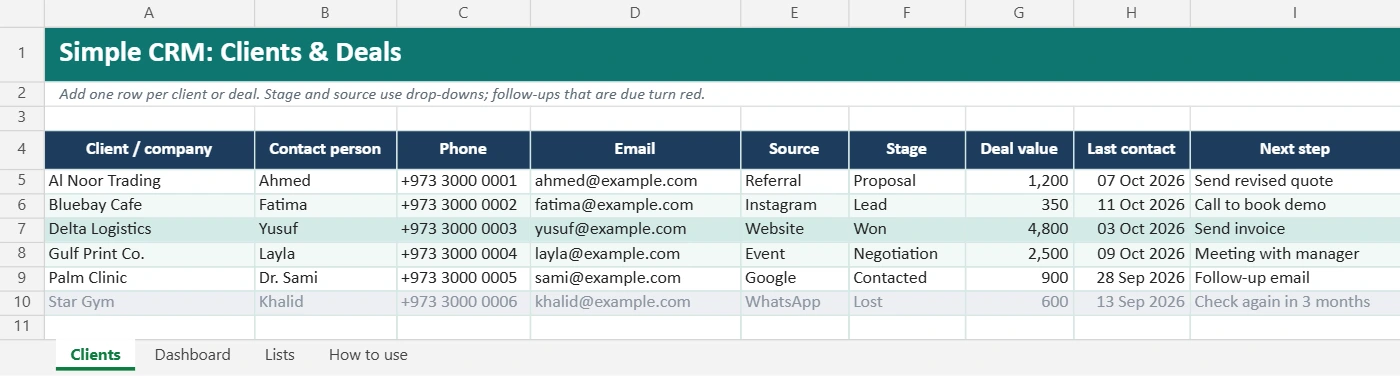
What is inside
| Sheet | What it does |
|---|---|
| Clients | One row per client or deal: contact, phone, email, source, stage, deal value, last contact, next step and date (room for 100 rows) |
| Dashboard | Deals and value by stage, open pipeline value, win rate and how many follow-ups are due |
| Lists | Edit the drop-down choices for Source and Stage |
| How to use | Quick instructions |
Smart features
- Red follow-ups: any next-step date that is today or overdue turns red.
- Going-cold warning: open clients you haven’t contacted for 14+ days turn orange.
- Color by result: won deals turn green, lost deals turn grey.
- Drop-downs for lead source and pipeline stage keep your data consistent.
- Filters on every column, so you can sort by next-step date or show one stage.
The 6 pipeline stages
| Stage | Meaning |
|---|---|
| Lead | A possible customer you haven’t spoken to yet |
| Contacted | You’ve had a first conversation |
| Proposal | You’ve sent a quote or proposal |
| Negotiation | Discussing price or details |
| Won | They said yes 🎉 |
| Lost | Not this time. Note why so you can learn from it |
You can rename the stages on the Lists sheet.
How to use it
- Clear the samples: delete the example rows on the Clients sheet.
- Add your clients: start with everyone you’re currently talking to.
- Always set a next step and date. This is the most important habit. A client without a next step is a client you’ll forget.
- Update after every contact: change the stage, last contact date and next step.
- Check red cells every morning. That’s your follow-up list for the day.
- Review the dashboard weekly: which stage do deals get stuck in? Which source brings the best clients?
Use it in Google Sheets
Download the file, then in Google Sheets choose File → Import → Upload. Share it with your sales team so everyone updates the same list.
When to move to a real CRM
A spreadsheet is perfect for a few dozen active clients. Consider dedicated CRM software when:
- Several people update the same records all day
- You need automatic email tracking or reminders on your phone
- You have hundreds of active deals
Until then, this template does the job, and it’s free.
FAQ
Can I add more columns?
Yes. Insert columns to the right of Notes, such as “Industry” or “Assigned to.” The dashboard keeps working.
Can I track WhatsApp customers?
Yes. Choose “WhatsApp” as the source. See our WhatsApp Business guide for organizing chats with labels.
Where do I put invoices?
Use our free invoice template once a deal is won.