
Whether you pay staff by the hour, track overtime or bill clients for your time, a simple timesheet saves arguments and mistakes. This free weekly timesheet calculates hours, overtime and pay automatically from start and end times.
Download the free weekly timesheet template (.xlsx)
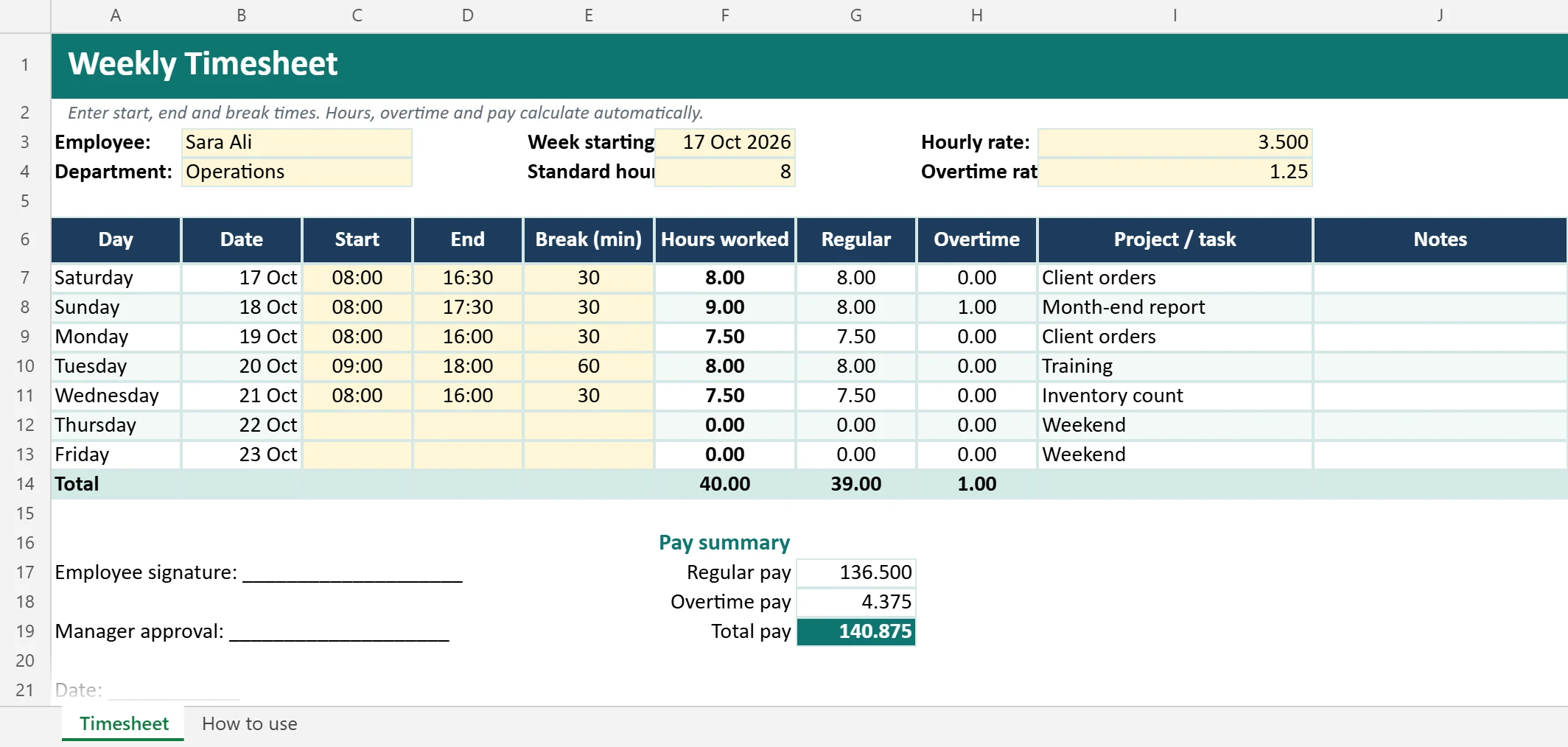
What is inside
| Feature | How it works |
|---|---|
| Automatic dates | Type the first day of the week. Day names and dates fill in. |
| Hours worked | Calculated from start time, end time and break minutes |
| Night shifts | Shifts that end after midnight are calculated correctly |
| Overtime | Hours above your standard day (8 by default) are counted as overtime and highlighted |
| Pay summary | Regular pay, overtime pay (rate × multiplier) and total pay |
| Project / task column | Record what each day was spent on, useful for client billing |
| Signatures | Employee and manager approval lines. Prints on one page. |
How to use it
- Set up the yellow cells: employee name, week start date, standard hours per day, hourly rate and overtime multiplier.
- Each day, enter the start time, end time and break in minutes. Use 24-hour format like
08:00and16:30. - Leave days off empty.
- Check the totals at the end of the week.
- Print or save as PDF for signatures, then copy the sheet for the next week.
How the hours are calculated
The template uses this formula for each day:
=ROUND(MOD(End-Start,1)*24 - Break/60, 2)MOD(…,1) handles shifts that pass midnight, and *24 turns Excel’s time into hours. Learn more about working with dates and times in Excel date functions and the TEXT function.
Example: a week with a night shift
| Day | Start | End | Break | Hours |
|---|---|---|---|---|
| Sunday | 08:00 | 17:00 | 60 min | 8.0 |
| Monday | 08:00 | 18:30 | 60 min | 9.5 (1.5 overtime) |
| Tuesday | 22:00 | 06:00 | 30 min | 7.5 |
Tuesday’s shift ends after midnight, and the template still calculates 7.5 hours correctly. With a standard day of 8 hours, Monday’s extra 1.5 hours are counted as overtime and paid at your overtime rate.
Example: the pay summary
With an hourly rate of 3.500 and an overtime multiplier of 1.25 (the template’s sample settings), the three days above give 23.5 regular hours and 1.5 overtime hours:
- Regular pay: 23.5 × 3.500 = 82.250
- Overtime pay: 1.5 × 3.500 × 1.25 = 6.563
- Total: 88.813
Change the rate and multiplier to match your company policy and local labour law.
A simple weekly approval routine
- Daily: employees fill in start, end and break times at the end of each day, not from memory on Thursday.
- End of week: the employee checks the totals and sends the sheet (or shares the Google Sheets link) to the manager.
- Manager review: check overtime and unusual days, ask questions within one or two days.
- Payroll: save a PDF of the approved week in a shared folder named by year and week.
Common mistakes: typing 5:30 instead of 17:30 for an afternoon finish, forgetting the break minutes, and copying last week’s sheet without changing the week-starting date.
Tips
- Fill it in daily, not at the end of the week. Memory isn’t reliable.
- Round consistently, for example to the nearest 15 minutes, if that’s your policy.
- Protect the formulas before sharing with staff. See how to protect a sheet.
- Check your local labor law for overtime rates, maximum hours and rest breaks.
Use it with your other HR templates
- Plan shifts with the shift schedule template.
- Track leave with the leave tracker.
- Track attendance with the attendance tracker.
FAQ
My week starts on Monday. Does it matter?
No. Just type a Monday date as the week start, and the days follow automatically.
Does it work in Google Sheets?
Yes. Import it with File → Import → Upload. Time formats and formulas keep working.
Is this timesheet template free?
Yes, for personal and business use. Please do not resell it.
Does it calculate overtime?
Yes. Hours above your standard day (8 by default) count as overtime, and the pay summary uses your overtime multiplier.