
Have you tried joining text with a date and got something like “Report date: 46310”? Or lost the leading zeros on employee IDs? The TEXT function fixes both. It turns a number or date into text in exactly the format you choose.
The syntax
=TEXT(value, format_text)- value: the number, date or cell to format
- format_text: a format code in quotes, such as
"dd/mm/yyyy"
The classic problem
="Report date: "&A2Result: Report date: 46310 😕 (Excel shows the date’s serial number)
="Report date: "&TEXT(A2,"dd mmm yyyy")Result: Report date: 15 Oct 2026 ✅
Date format codes
| Code | Result (for 15 Oct 2026) |
|---|---|
"dd/mm/yyyy" |
15/10/2026 |
"d mmm yyyy" |
15 Oct 2026 |
"dd mmmm yyyy" |
15 October 2026 |
"yyyy-mm-dd" |
2026-10-15 |
"dddd" |
Thursday |
"ddd" |
Thu |
"mmmm" |
October |
"mmm-yy" |
Oct-26 |
Tip: d = day, m = month, y = year. More letters = longer format.
Number format codes
| Code | Value | Result |
|---|---|---|
"#,##0" |
1234567 | 1,234,567 |
"#,##0.00" |
1234.5 | 1,234.50 |
"#,##0.000" |
1234.5 | 1,234.500 (3-decimal currencies like BHD) |
"0%" |
0.256 | 26% |
"0.0%" |
0.256 | 25.6% |
"00000" |
42 | 00042 (leading zeros) |
"#,##0,\K" |
125000 | 125K |
Time format codes
| Code | Result |
|---|---|
"hh:mm" |
14:30 |
"h:mm AM/PM" |
2:30 PM |
"[h]:mm" |
Total hours over 24, e.g. 37:15 |
Useful examples
A dynamic report title:
="Sales report for "&TEXT(TODAY(),"mmmm yyyy")A sentence with money:
="Total due: "&TEXT(B10,"#,##0.000")&" BHD"Percentage in a summary:
="Sales grew by "&TEXT(C2,"0.0%")See how to calculate percentage change.
Employee IDs with leading zeros:
="EMP-"&TEXT(A2,"0000")Result: EMP-0042
Day name from a date:
=TEXT(A2,"dddd")More date tricks in Excel date functions.
Build a format tester in 1 minute
The fastest way to learn format codes is to try them. Put values in column A, format codes in column B (typed as plain text), and this formula in C2, then fill down:
=TEXT(A2,B2)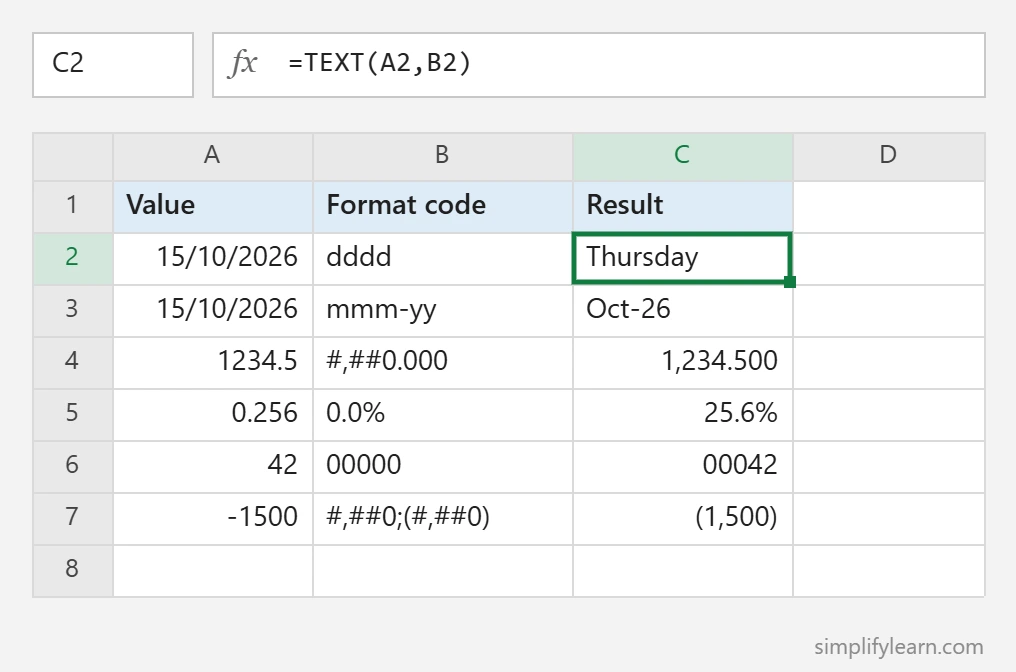
Change any code in column B and see the result immediately. Notice the last row: a format code can have sections separated by semicolons, positive;negative, so #,##0;(#,##0) shows negative numbers in brackets, like accountants do.
Important: TEXT returns text
The result looks like a number or date, but it’s text, so you can’t add it up or sort it as a date. Rules of thumb:
- Use TEXT when you’re joining values into a sentence or label.
- Use cell formatting (Ctrl + 1) when the cell needs to stay a real number or date for calculations.
Common mistakes
- Forgetting quotes around the format code:
=TEXT(A2,dd/mm/yyyy)gives an error. - Using “mm” for minutes alone: Excel treats
mmas months unless it’s next to hours or seconds. Use"hh:mm". - Different language settings: in some non-English versions of Excel, date codes use different letters. If a code doesn’t work, check your regional settings.
- Doing math on the result: convert it back with
VALUE()or, better, keep the original number.
Google Sheets
TEXT works the same way in Google Sheets: =TEXT(A2,"dd mmm yyyy").
FAQ
Why does TEXT give a #VALUE! error?
Usually the format code is not valid, or the value is text that only looks like a number. Check the quotes around the code and try VALUE() on the input.
Can TEXT show negative numbers in brackets?
Yes. Use two sections: =TEXT(A2,”#,##0;(#,##0)”) shows -1500 as (1,500).
Should I use TEXT or cell formatting?
Use cell formatting (Ctrl + 1) when the cell must stay a number for totals and charts. Use TEXT only when you join values into a sentence or label.
Does TEXT work the same in Google Sheets?
Yes, the common date and number codes are the same.
See all of Excel’s text functions in Microsoft’s Text functions reference.
Quick summary
=TEXT(value,"format")formats numbers and dates inside formulas.- Use it when joining text with dates, money or percentages.
- The result is text. Use cell formatting when you still need to calculate.