
Deadlines, due dates, working days, employee service, contract renewals. Dates are everywhere in office work. This guide covers the Excel date functions you’ll actually use, with ready-to-copy formulas. It also shows how to handle a Friday–Saturday weekend, which many guides skip.
First: how Excel stores dates
Excel stores every date as a number: 1 January 1900 is 1, and each day adds 1. That’s why you can subtract two dates to get the number of days between them:
=B2-A2If a date shows as a number like 46300, change the cell format to Date (Home → Number Format). If dates won’t calculate, they may be stored as text. See numbers stored as text.
Quick reference
| Function | What it does | Example |
|---|---|---|
| TODAY() | Today’s date (updates daily) | =TODAY() |
| NOW() | Current date and time | =NOW() |
| DATE(y,m,d) | Builds a date | =DATE(2026,12,16) |
| EDATE(date, months) | Same day, X months later/earlier | =EDATE(A2,12) |
| EOMONTH(date, months) | Last day of a month | =EOMONTH(A2,0) |
| NETWORKDAYS.INTL | Working days between dates | =NETWORKDAYS.INTL(A2,B2,7) |
| WORKDAY.INTL | Date after X working days | =WORKDAY.INTL(A2,10,7) |
| DATEDIF | Years/months/days between dates | =DATEDIF(A2,TODAY(),"y") |
| WEEKDAY | Day of the week as a number | =WEEKDAY(A2,2) |
| TEXT | Day or month name | =TEXT(A2,"dddd") |
EDATE: add months
=EDATE(A2, 12)A contract that starts on 15-Mar-2026 renews on 15-Mar-2027. Use negative numbers to go back: =EDATE(A2,-3). Handy for probation end dates, renewals and warranty expiry.
EOMONTH: end of the month
=EOMONTH(A2, 0): last day of the same month=EOMONTH(A2, 1): last day of next month (a common payment due date)=EOMONTH(A2, -1)+1: first day of the month
NETWORKDAYS: count working days
The basic version assumes a Saturday–Sunday weekend:
=NETWORKDAYS(A2, B2, Holidays!A2:A15)For a Friday–Saturday weekend (used in Bahrain, Saudi Arabia, Kuwait, Qatar and Oman), use NETWORKDAYS.INTL with weekend code 7:
=NETWORKDAYS.INTL(A2, B2, 7, Holidays!A2:A15)| Weekend code | Weekend days |
|---|---|
| 1 (default) | Saturday, Sunday |
| 7 | Friday, Saturday |
| 16 | Friday only |
| 11 | Sunday only |
Need a custom pattern? Use a 7-character text code starting Monday, where 1 = weekend. Friday–Saturday = "0000110".
The holidays list is optional. Put your public holidays (Eid, National Day…) in a column and reference it.
WORKDAY: find a deadline in working days
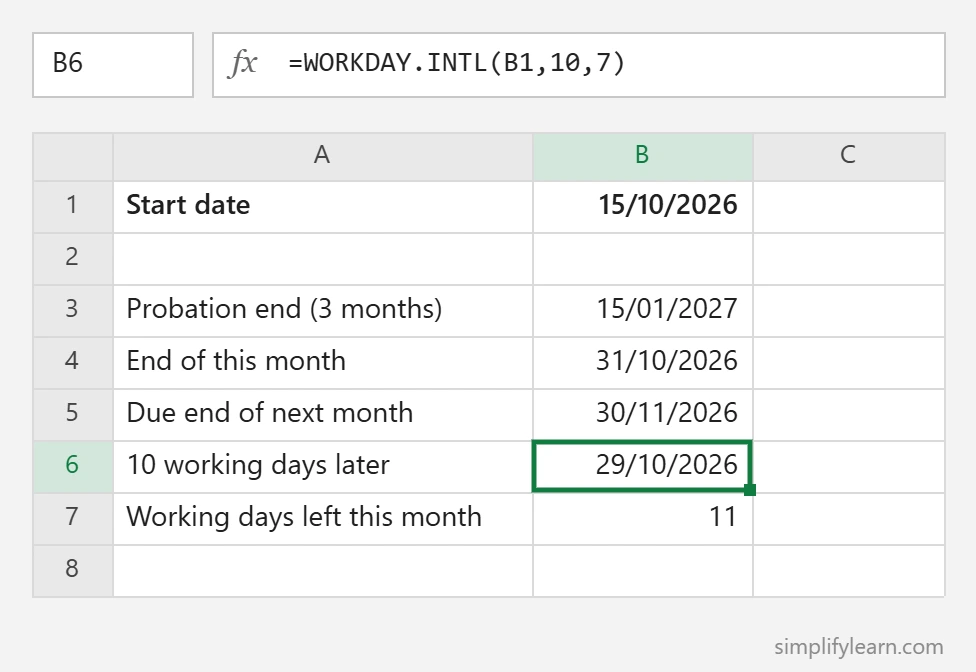
=WORKDAY.INTL(A2, 10, 7, Holidays!A2:A15)Returns the date that’s 10 working days after A2, skipping Fridays, Saturdays and holidays. It’s perfect for “reply within 10 working days” deadlines.
DATEDIF: age and years of service
DATEDIF isn’t in Excel’s function list, but it works in all versions:
=DATEDIF(A2, TODAY(), "y")| Unit | Returns |
|---|---|
| “y” | Complete years |
| “m” | Complete months |
| “d” | Days |
| “ym” | Months left over after whole years |
Years and months of service in one cell:
=DATEDIF(A2,TODAY(),"y")&" years, "&DATEDIF(A2,TODAY(),"ym")&" months"Result: 4 years, 7 months. Note: the start date must be earlier than the end date, or you’ll get #NUM!. Avoid the “md” unit, which can give wrong results.
WEEKDAY: is it a weekend?
=WEEKDAY(A2, 2)With type 2, Monday = 1 … Sunday = 7. To flag Friday/Saturday:
=IF(OR(WEEKDAY(A2,2)=5, WEEKDAY(A2,2)=6), "Weekend", "Workday")Or show the day name: =TEXT(A2,"dddd") → “Thursday”. More formats in the TEXT function guide.
Practical examples
| Task | Formula |
|---|---|
| Days until a deadline | =B2-TODAY() |
| Days overdue (0 if not) | =MAX(0,TODAY()-B2) |
| Probation end (3 months) | =EDATE(A2,3) |
| Invoice due at end of next month | =EOMONTH(A2,1) |
| Working days in this month (Fri–Sat weekend) | =NETWORKDAYS.INTL(EOMONTH(TODAY(),-1)+1,EOMONTH(TODAY(),0),7) |
| Age in years | =DATEDIF(A2,TODAY(),"y") |
Highlight overdue dates automatically with conditional formatting.
Quick summary
- Dates are numbers, so you can subtract them to get days.
- EDATE adds months. EOMONTH gives the month end.
- NETWORKDAYS.INTL / WORKDAY.INTL with code 7 handle Friday–Saturday weekends.
- DATEDIF calculates age and years of service.