
Company dinners, product launches, workshops and customer evenings all need the same things: a timeline, a budget and a guest list. This free template puts all three in one file, and calculates every due date from your event date.
Download the free event planner template (.xlsx)
What is inside
| Sheet | What it does |
|---|---|
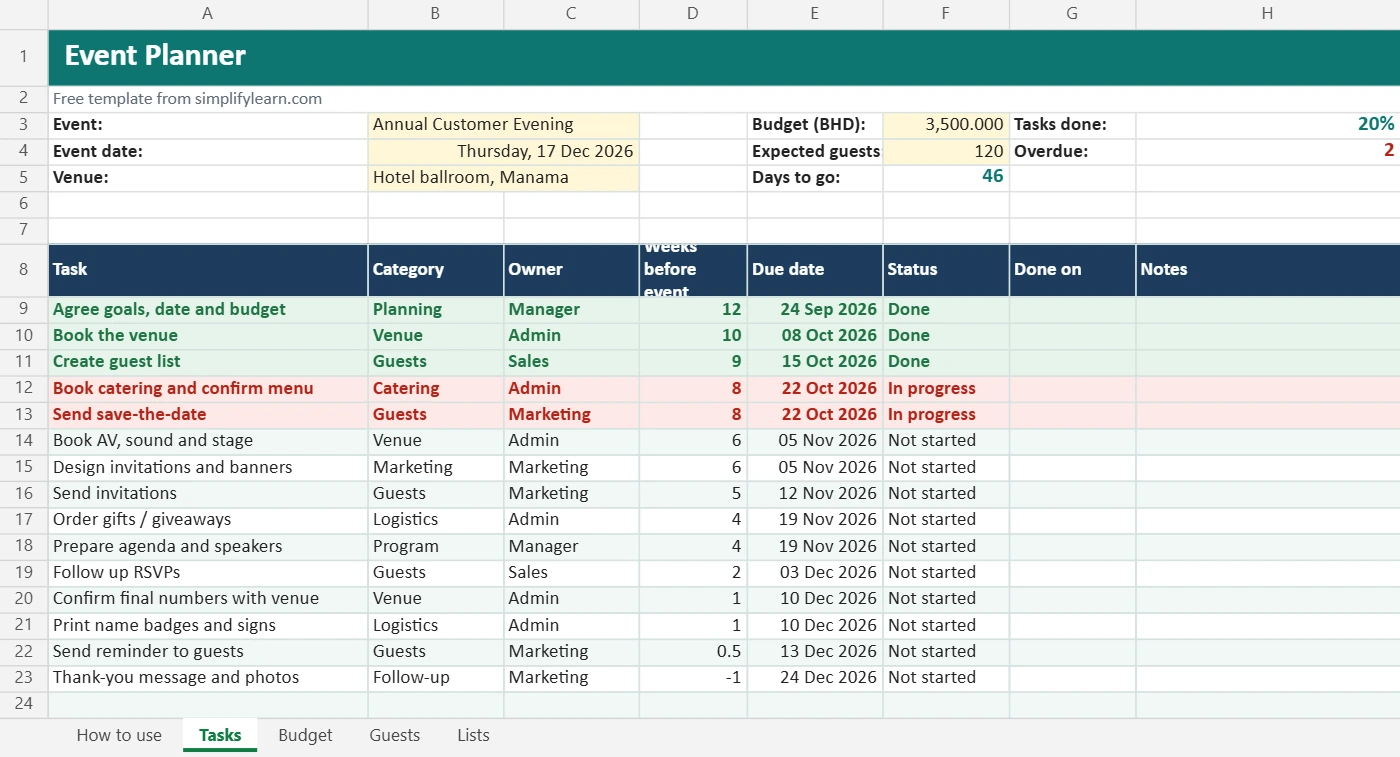
| Tasks | 15 ready-made tasks from 12 weeks before to the follow-up. Due dates calculate from the event date. There’s a days-to-go counter, % done and overdue count. |
| Budget | Estimated vs actual for each item, difference, paid/unpaid, and remaining budget |
| Guests | Name, company, contact, RSVP (Yes/No/Maybe/Pending), number of people and notes such as dietary needs. Attendance totals update automatically. |
| Lists | Edit categories and status options for the drop-downs |
Overdue tasks turn red, finished tasks turn green, and over-budget items are highlighted.
How to use it
- On the Tasks sheet, enter the event name, date, venue, budget and expected guests.
- Adjust the task list and the Weeks before event column. Due dates update instantly.
- Assign an owner to each task and update the status as you go.
- Enter quotes on the Budget sheet, then the actual amounts when you pay.
- Add guests and track RSVPs on the Guests sheet.
A simple event timeline
- 8–12 weeks before: goals, budget, venue, guest list.
- 5–8 weeks: catering, AV, save-the-date, invitations designed.
- 2–5 weeks: send invitations, order gifts, prepare the agenda.
- Final week: confirm numbers, badges, signs and send a reminder.
- After: thank-you message, photos and a quick review of what to improve.
Tips
- Keep about 10% of the budget as contingency.
- Use an online form or booking link for RSVPs, then paste the answers into the guest list. See online booking systems.
- Use AI to draft invitations and the agenda. See planning meetings with AI.
- Collect feedback after the event with our customer feedback log.