
This free yearly attendance tracker gives you one Excel file for the whole year: a sheet for every month, drop-down attendance codes, automatic totals per employee and a year summary that shows each person’s attendance month by month. Set the year, your weekend and your public holidays once, and every month fills in its own calendar.
Download the free yearly attendance tracker (.xlsx)
What is inside
| Sheet | What it does |
|---|---|
| Year Summary | Attendance % for each employee for every month, plus yearly totals of present, absent, leave and sick days and a team average. Below 90% turns red, 95% or more turns green. |
| Settings | Company name, year, and weekend (Friday–Saturday or Saturday–Sunday) |
| Employees | Up to 25 employees with department and start date. Names flow into all 12 months automatically. |
| Holidays | Up to 40 public holidays, shaded on the month sheets and excluded from working days |
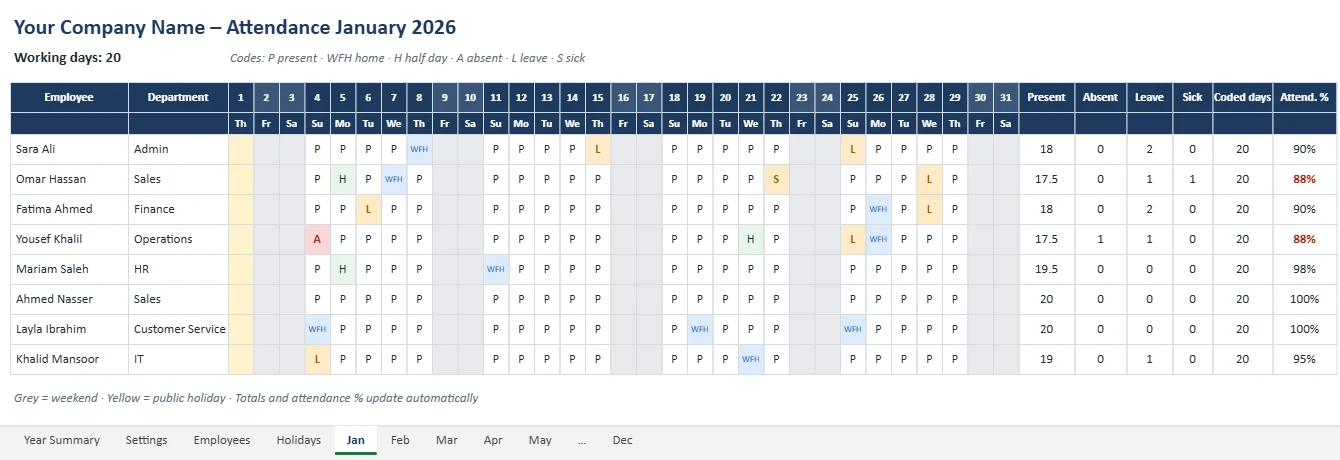
| Jan – Dec | A day-by-day grid for each month with drop-down codes, automatic dates and weekday names, working days, and totals per person |
Attendance codes
| Code | Meaning | Counts as |
|---|---|---|
| P | Present | 1 day present |
| WFH | Working from home | 1 day present |
| H | Half day | 0.5 day present |
| A | Absent (red) | Absent |
| L | Leave (amber) | Leave |
| S | Sick leave (amber) | Sick |
Attendance % = days present ÷ days with a code. Empty cells such as weekends, holidays and future days never count against anyone.
How to use it
- Settings: type your company name and the year, and choose your weekend.
- Employees: replace the sample names with your team.
- Holidays: replace the example dates with your country’s public holidays for the year.
- Each day: open the month sheet and pick a code for each person from the drop-down. Leave weekends and holidays empty.
- Each month end: check the totals and the Year Summary. Red percentages show who may need a conversation.
Example: reading the January sheet
January 2026 has 20 working days with a Friday–Saturday weekend and 1 January as a holiday. In the sample, Omar has 16 × P, 1 × WFH, 1 × H, 1 × L and 1 × S. His present total is 16 + 1 + 0.5 = 17.5, he has 20 coded days, so his attendance is 17.5 ÷ 20 = 88%, shown in red because it is below 90%. If his leave and sick day were approved, a short note on the Employees sheet explains it at the year review.
Use it in Google Sheets
Upload the file to Google Drive, open it with Google Sheets and choose File → Save as Google Sheets. The drop-downs, formulas, and weekend and holiday shading all keep working, so managers can update attendance from their phones.
Monthly or yearly tracker?
Need just one month at a time? Use the simpler monthly attendance tracker. Choose this yearly version when you want all 12 months in one file and a year-end summary for reviews, payroll checks or HR reports. Approved leave balances belong in the leave tracker, and hours worked in the timesheet template.
FAQ
Is this yearly attendance tracker free?
Yes, for personal and business use. Please do not resell it.
How many employees can it track?
25 employees out of the box. To add more, insert rows inside the employee area on every month sheet and on the Year Summary, and copy the formulas down.
Can I change the weekend to Saturday–Sunday?
Yes. Choose Sat-Sun on the Settings sheet. Weekend shading and working days update on all 12 months.
How do I start a new year?
Save a copy of the file, change the year on the Settings sheet, update the holiday dates and clear the codes on the month sheets.
Does it work in Google Sheets?
Yes. Upload it to Google Drive and open it with Google Sheets. Drop-downs, colours and formulas keep working.